%20(1).png)
GUIDELINES
-
The page capturing the bank or card details needs and the email confirmation to contain the words “Direct Debit Instruction”. Traditionally displayed at the top of the page as a header.
-
If the page is displaying a set of recurring payment value on screen, it is recommended for the ‘Payment Agreement’ section to contain the following:
-
“For the total amount billed for the specified period, including any amendments or associated charges, as agreed under the Direct Debit Instruction and subject to the Direct Debit Guarantee”
-
-
If Bank account is selected as payment method the page is to display the following in the area where the bank details are being added:
-
“I/We authorise and request Worldpay (UK) Limited (Service User Number: 536609) to debit payments from my/our account as specified below, at intervals and amounts as directed by UK Internal Testing ("The Business") as per the Terms and Conditions of my agreement with The Business and in accordance with this Direct Debit Agreement.”
-
-
If card is selected as payment method, the following needs to be displayed in the area where the card details are being entered:
-
“By signing this form, I / we acknowledge that IPY*<insert ”Trading Name”> will appear as the payment notation on my credit card statement.”
-
If using your own merchant facility, please contact us for further details.
-
-
The page needs to contain an Acceptance section where the customer agrees to the following points, has the ability to view and review the Direct Debit Guarantee and is provided with an “I Agree” checkbox and this action is logged. The details are:
-
“By checking I Agree" below and clicking the "Continue" button you acknowledge and agree that:
-
“I confirm I have read and agree to the Direct Debit Guarantee and Terms. I understand this is a recurring payment agreement.”
-
-
-
Recommended the page has Captcha or similar prior to submit.
-
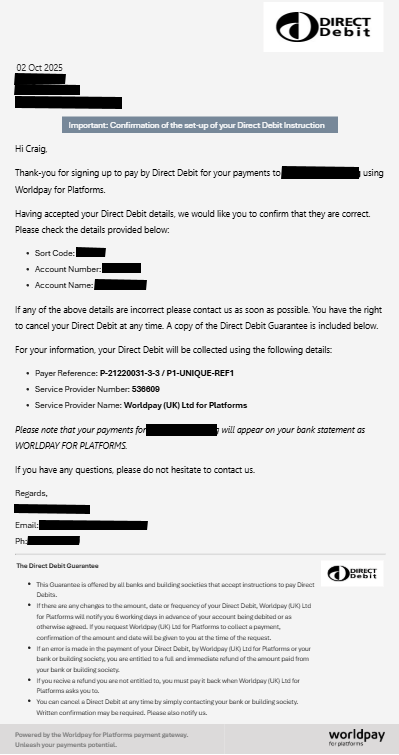
Upon submit, Customer is to be emailed a copy of the details entered and agreed to in a single page (masking card and bank account details). This document must include the users IP Address and be identifiable by a unique “Direct Debit Instruction Reference”. This must be visible on all emails, and each email must be able to be reproduced when required. Included or attached must be a copy of the Direct Debit Guarantee terms.
-
Please note - if the customers payment details are changed/updated, a new copy of the details entered and agreed to, must be sent to the customer each time.
-
-
Customer email confirmation (point 8) needs to be saved by the client as this form and email may be required to prove direct debit acceptance in the case of an indemnity claim or dispute request.
Example Email
Check Sheet
-
Page header “Direct Debit Instruction”
-
Email header “Direct Debit Instruction”
-
All details on one page
-
All details in body of email
-
Page says, “Payment Instruction.”
-
Emails says, “Payment Instruction.”
-
Page has details of “masked bank or card details”
-
Emails have details of “masked bank or card details”
-
Emails have users IP address.
-
Emails have Unique Reference eg GUID
-
If bank page has section containing our “Service User Number”
-
If bank email has section containing our “Service User Number”
-
If card payment the page has section containing the “payment notation” details
-
Page must have an “Acceptance section” so payer agrees to terms etc
-
Direct Debit Guarantee terms provided or attached on the confirmation email.
-
Page should have ReCAPTCHA or similar.
-
Customer must be emailed a copy of everything they have agreed to.
-
Customer email should be in similar format to the example above.
-
Email must be saved.
-
Email must be retrieved if required by Worldpay for Platforms